About the Topic List
The Topic List is designed to provide structured learning paths for Competitive Programming. Each topic is categorized by difficulty and importance to guide learners from basic to advanced levels.
Story
Hi, I am YouKn0wWho and I have been doing CP for around 8 years and from the very beginning what I have been feeling is a need for a comprehensive topic list that will contain all sorts of topics from easy to advanced with corresponding tutorials, problem lists and templates so that I wouldn’t have to look at different sites, from here to there. So what do you do when you think something is missing from the world? Yeah, you create that thing! So here I am, sharing the ultimate topic list that you will need in CP.
History
I previously created a topic list in 2021 and posted it on Codeforces here. It got great responses. It got 4000+ upvotes, became the most upvoted blog on Codeforces in its history and the blog website has been visited 200k+ times! But it contained links to only 1-2 resources and problems per topic and it didn’t contain basic topics for beginners. Also, there was no way of tracking your progress.
Then in 2024, I decided to improve it, by a lot. It took me on average 6h-10h per day for straight one month to complete this project (also I was doing a full-time job during the whole time). I hope it was worth it! I am also keeping it updated and adding new topics, resources, and problems regularly. Also I am adding new features that people are asking for.
Topics
A topic is a concept or a technique that is used in solving problems. In this topic list, not all topics are actual topics per se, some are useful techniques or an educational problem or resource but contains ideas which can be used in future problems.
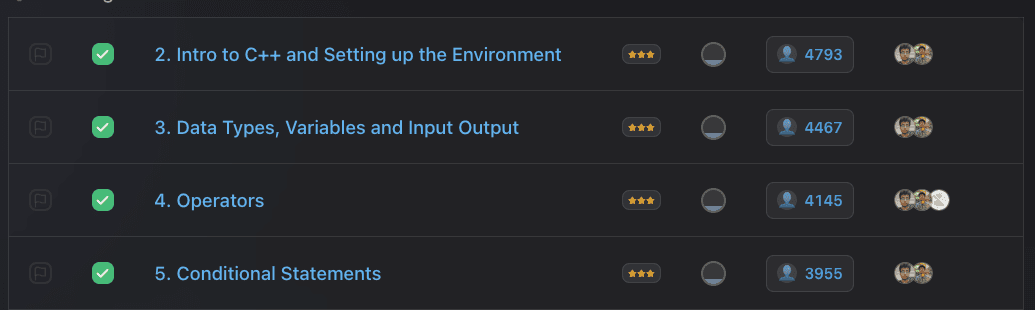
Each topic is classified by difficulty and importance, and is accompanied by a list of resources, templates, and problems to practice. The topics are categorized in a structured manner like all Number Theory topics are grouped together, all Graph Theory topics are grouped together and so on. Under each category, you will find some subcategories like under Data Structures you will find Segment Tree and under this subcategory, you will find different variations and topics related to Segment Tree.
Topic Difficulty
Topics are classified into several difficulty levels:
Note that the difficulty levels are subjective and may vary depending on the learner's experience and familiarity with the topic.Also it is hard to classify a topic based on Codeforces rating, as in Codeforces you can have a high rating without knowing barely any topic. But these topics might be important in ICPC contests. So, I just provided a rough estimate of the difficulty and you should adjust it according to your experience.
Topic Importance / Relevance
Importance/Relevance is indicated by stars, which reflects the frequency, relevance and likelihood of topics appearing in a future contest.
Note that some 3 star topics might not be that frequent in contests but they are important to know in Competitive Programming.Each topic has some resources, templates and practice problems.
Resources
A resource is a tutorial or a blog or a video that explains the topic. Resources are listed in the recommended order of study. But it would be better if you go through all the resources listed in the topic. I have also tried to add some comments on the resources to mention in which part of the resource you will find the topic.
Templates
A template is a code snippet that is used to solve problems related to the topic. Templates are provided as a reference and it is highly recommended to create your own templates.
You may not call it a template because some of them don’t support the generalized use of the topic. But you can use them easily if you understand the topic and solve problems using that template.
Problems
I have also attached some related problems to each topic so that you can practice the topic. Problems are taken from various online judges like Codeforces, AtCoder, CodeChef, etc. Starred problems are highly recommended for solving to grasp the topic thoroughly. Problems are organized by their relevance and difficulty concerning the topic. You can solve them in the given order.
Problem Difficulty
Problems are classified into several difficulty levels. The difficulty means how hard the problem is w.r.t. to the difficulty level of this topic (so it's not same as the topic difficulty level).
- Easy
- Medium
- Hard
- Very Hard
Note that the difficulty levels are subjective and may vary depending on the learner's experience and familiarity with the topic.
Topic Filtering
You can filter topics by difficulty and importance. The topics will be displayed in a structured manner, with each category containing subcategories and topics. You can also use the "Hide Completed" toggle to focus only on topics you haven't completed yet.
Problem Source Filtering
When viewing problems in topic pages or mixed practice, you can filter problems by their source platforms. This filtering helps you practice problems from your preferred platforms or explore new ones. It's recommended to keep all sources selected for maximum variety in your practice.
Codeforces Connect
Connect your Codeforces account to automatically sync your solved problems! This feature helps you track your progress without manually marking each problem as solved.
- Verification Process: To verify your Codeforces handle, you'll submit a unique compilation error to a specific problem. This proves you own the account. The process takes less than 2 minutes.
- Auto-Sync on Topic Pages: When you visit any topic page, we automatically check your recent 100 Codeforces submissions and sync any solved problems from that topic. New synced problems are highlighted with a notification.
- Manual Sync: Click the sync button on topic pages to fetch all your submissions for that topic (not just recent 100). This is useful if you solved problems long ago.
- Full Sync: From the main topic list page, use "Full Sync" to fetch ALL your Codeforces submissions and sync them with our database. You can choose a date range to avoid re-syncing old submissions.
- Verified Badge: Your verified Codeforces handle appears with a blue verified badge on the leaderboard, contributions page, and community solutions. This distinguishes verified accounts from unverified ones.
- Rating Colors: Your handle is displayed in the official Codeforces rating color based on your max rating (gray for newbie, green for pupil, cyan for specialist, etc.).
- Codeforces Max Rating: Your Codeforces max rating is displayed on your profile and you will get 2 Aura per rating of your verified Codeforces max rating (e.g., 1800 rating = 3600 Aura!).
💡 Tip: Connect your Codeforces account from the User Stats section on the main topic list page. Look for the "Connect Codeforces" button!
Community Solutions
For each problem in the topic list, you can view and share solutions with the community. This feature helps you learn from others and contribute your own insights.
- Share Your Solutions: Logged-in users can submit their solutions or explanations for any problem. You can choose between two formats: Code Only (+64 Aura) for quick code sharing with automatic syntax highlighting, or Markdown Editorial (+128 Aura) for detailed explanations with formatting. Editorials earn 2x more Aura because they help others learn!
- Language Support: When sharing code, select from popular programming languages including C++, Python, Java, JavaScript, Rust, Go, and more. Your code will be displayed with proper syntax highlighting.
- Community Voting: Help identify the best solutions by upvoting helpful ones and downvoting less useful submissions. Solutions are automatically sorted by their vote count, ensuring the most valuable solutions appear first. You earn +16 Aura for each net vote your solutions receive, and +8 Aura for each vote you give to help rate others' solutions!
- Edit and Delete: You can edit or delete your own solutions anytime. Keep your solutions updated as you learn better approaches.
- Solution Count: See at a glance how many solutions have been shared for each problem in the problems table. Click the count to view all solutions or click the "+" to be the first to share.
Contributing solutions helps build a collaborative learning environment where everyone can benefit from different approaches and explanations. Remember to add helpful comments and clean up your code before sharing!
Topic Module
We have also created some modules for specific difficulty level and importance level. You can select the module you want to learn.
Topic Searching
You can also search for topics by name to quickly find the topic you are looking for. The search is case-insensitive and will return all topics that contain the search query.
Note that first the filtering happens and then the searching happens on the filtered topics.
Also you can type / on keyboard to search for topics as a shortcut.
Progress Tracking
You can track your progress by marking the topics you have completed and the problems you have solved. We will then show you the progress you have made in the topic list.
Status Tracking
You can track the status of each resource and problem in the topic page. You can mark them as Not Started, Completed, Skipped, or Ignored. Additionally, we show all your skipped resources and problems in the main page under the "Skipped Items" button so that you can easily revisit them later.
Activity Heatmap(s)
We show two heatmaps in the topic list page. One heatmap shows the topics you have completed and the other heatmap shows the problems you have solved. This will be useful if you want to knowing you activity in the topic list at a glance.
Aura Farming ✨
Aura reflects your overall engagement and activity across the platform. It rewards not just topic completion but also problem-solving, contributions, consistency, and community engagement. Here's how you can farm Aura:
Shareable Profile
You can create a shareable public profile that showcases your progress in the Topic List. This profile is perfect for sharing with friends, team members, or even on your resume! Here's what your profile includes:
- Personal Stats: Display your total topics completed, problems solved, total Aura, global rank, and overall progress percentage.
- Aura ✨: Your total Aura reflects overall engagement and activity across the platform. See the Aura Farming section above for details on how Aura is calculated.
- Tier Badge: Show off your achievement tier based on total Aura farmed. All tiers:
Icon Tier Aura Required ✨ 👻 NPC 0-499 Aura 😎 Chad 500-2,499 Aura 💪 Mega Chad 2,500-4,999 Aura 🦾 Giga Chad 5,000-9,999 Aura 🦁 Ultra Chad 10,000-17,499 Aura 🦅 Alpha Supreme 17,500-29,999 Aura 👾 Sigma Eternal 30,000-49,999 Aura 🗿 Final Boss 50,000+ Aura - Level System: Display your progression level earned by completing topics. For levels 1-10, you need increasing topics (1, 2, 3... topics) to level up, providing quick early wins. After level 10, you farm 1 level for every 10 topics completed. The level badge shows how many more topics you need to reach the next level, motivating consistent progress.
Level Topics Needed Level 1 1 topic Level 2 2 topics Level 3 3 topics Level 4 4 topics Level 5 5 topics Level 6 6 topics Level 7 7 topics Level 8 8 topics Level 9 9 topics Level 10 10 topics Level 11+ 10 topics per level - Topic Grid: A visual Project Euler-style grid displaying all topics as clickable squares. Completed topics are highlighted in green with a checkmark, while incomplete topics remain dimmed. Hover over any square to see the topic name, category, and completion status. Click to open that topic directly.
- Activity Heatmap: Visualize your learning consistency with a GitHub-style heatmap showing your daily topic completions.
- Activity Trends: View your progress over the last 6 months with an interactive chart showing topics completed per month.
- Category Progress: See your completion status for each category (Basics, Data Structures, Graph Theory, etc.) with beautiful progress bars and Category Badges.
- Category Badges: Earn special badges when you complete categories, like "Fundamentals Master" for Basics or "DP Demon" for Dynamic Programming. Each category has custom unlock thresholds.
- Recent Activity Timeline: Display your last 20 activities showing both topics completed and problems solved with timestamps.
Category Badges (3-Tier System)
Unlock special badges by completing topics in each category. Each category has 3 tiers of badges you can earn:
🥉
Bronze
+256 Aura ✨
🥈
Silver
+512 Aura ✨
🥇
Gold
+1024 Aura ✨
💡 Tip: You can earn up to 3 badges per category. For example, completing 35% of Basics topics earns you "Basics Bronze" (+256 Aura), then reaching 60% upgrades you to "Basics Silver" (+512 more Aura), and hitting 90% gets you "Basics Gold" (+1024 more Aura)!
To access your profile, click the "Profile" button in the topic list page. You can then share your profile link with anyone, and they'll be able to see your impressive progress!
🎁 Wrapped (Year in Review)
Get your personalized Topic List Wrapped - a Spotify-style year-in-review experience that showcases your coding journey! See your achievements, stats, and highlights presented in beautiful, swipeable slides with a gaming-inspired theme.
- Time Period Selection: Choose to view your stats for a specific year or "All Time" to see your complete journey. The year selector shows all years you've been active.
- Interactive Slides: Navigate through 12 beautifully designed slides using swipe gestures, keyboard arrows, or click navigation. Watch as the entire card smoothly slides in and out with each transition.
- Aura Journey: See your total Aura gained, with a breakdown of before vs. after stats. Watch your tier progress and celebrate level-ups!
- Topics & Problems: View how many topics you completed and problems you solved, with level progression and averages per month.
- Top Categories: Discover your top 5 most practiced categories with visual progress bars and rank badges (gold, silver, bronze).
- Consistency Stats: See your longest streak, days visited, and best months for both topics and problems - celebrate your dedication!
- Activity Heatmap: A GitHub-style calendar showing your problem-solving activity throughout the year, with intensity colors indicating daily activity levels.
- Badges Earned: See all new badges you unlocked during the selected period, or view your complete badge collection for "All Time".
- Community Impact: Track your contributions, solutions posted, and votes given/received with visual vote ratio bars.
- Chronotype: Discover when you code best! Based on your problem-solving times, find out if you're an "Early Bird", "Night Owl", "Midnight Hacker", or another coding personality, with a 24-hour activity chart.
- Difficulty Distribution: See how your completed topics are distributed across difficulty levels with colorful progress bars.
- Summary Card: A beautiful summary slide perfect for screenshots! Shows your key stats including profile, topics, problems, streak, aura, level, top category, badges, and chronotype all in one shareable view.
🎁 Access Wrapped: Click the "Wrapped" button in the sidebar navigation on the main topic list page. Select your year and enjoy your personalized year-in-review experience!
Team View
You can create a team and invite your team members to join the team. By creating a team, you will be able to see the topics completed by your team members and a new team view will get unlocked. To create a team, go to the Teams page in the topic list.

Mixed Practice
The Mixed Practice feature allows you to practice problems from multiple topics simultaneously without knowing which topic each problem belongs to. This helps you develop pattern recognition skills and prepares you for contests where you don't know the topic beforehand.
- Topic Selection: Choose up to 16 topics from the comprehensive topic list to create your mixed problem set. You can also use Blind Selection to randomly pick topics based on categories, difficulty levels, and completion status (all topics, completed only, or not completed only) you specify.
- Smart Mixing: Problems are mixed using different sorting algorithms including smart mix (balanced difficulty progression), random shuffle, difficulty-based sorting, and solve count-based sorting.
- Progress Tracking: Track your solving progress with visual statistics showing solved, remaining, and completion percentage.
- Customizable Display: Toggle visibility of problem difficulty and solve count columns, plus filter to hide solved problems and focus on unsolved ones.
- Session Persistence: Your selected topics and problem order are saved locally and can be shared via URL as well.
- Flexible Controls: Regenerate new problem sets, reshuffle existing ones, or clear your session anytime.
This feature is particularly useful for contest preparation, as it simulates the real contest environment where you need to identify problem types and apply appropriate techniques without knowing the topic in advance.
Contributing
In each topic page, besides the Resource, Template, and Problems section, you will find a + icon. Clicking on that will give you the option to contribute to that topic. You can add a new resource, a new template, or a new problem. Once you suggest a contribution, it will be reviewed by the admin and if it is found to be useful, it will be added to the topic page.
Trending Topics
The Trending Topics page shows you the most popular topics that people are currently learning in the community. You can view trending topics across different time ranges:
- Weekly: See what topics have been popular in the last 7 days.
- Monthly: Discover the most studied topics in the last 30 days.
- Quarterly: View trends over the past 3 months.
- Yearly: See which topics have been most popular this year.
- All Time: Discover the most completed topics since the topic list was created.
You can also filter trending topics by category, difficulty, and importance to find exactly what you're looking for. This feature helps you stay aligned with what the community is focusing on and discover popular learning paths. The trending data updates every 6 hours to reflect the latest community activity.
Topic List Analytics
The Topic List Analytics page provides comprehensive insights into community growth and engagement. Here's what you can discover:
- Total Users: See how many people have registered and are using the topic list.
- Topics Completed: View total topics completed across all users, along with average topics per user.
- Problems Solved: Track total problems solved across all users, with average problems per user.
- Last 30 Days Activity: Monitor recent community engagement including new user registrations, topics completed, and problems solved in the past month.
- User Tiers: See the distribution of users across different achievement tiers (Giga Chad, Mega Chad, Chad, etc.) based on topics completed.
- Growth Charts: Interactive visualizations showing monthly trends for new users, topics completed, and problems solved over time.
- Top Users: View leaderboards for top 10 users by topics completed and top 10 problem solvers.
The analytics page helps you understand the vibrant community you're a part of and motivates you to see others' progress. All analytics data is updated once every day to provide accurate and up-to-date information.
Feedback
If you have any feedback, suggestions, or want to report a bug, feel free to send me a direct message on Codeforces or contact me on Discord: Join Discord Server. All public discussions regarding the topic list will be done in the Discord server.
Send a Tip
There is a cost associated with maintaining the topic list, mainly the server cost. It will increase as the user base grows.
If you want to help me with this and if you like my work and want to send me a tip, you can send it here: Buy Me a Coffee. Any amount is appreciated. Thank you!
Last Words
I have been doing this CP thing for around 8 years now! Like always, all I want to say is, please don't forget to enjoy the journey and have fun while riding the boat. Whatever you do, try to pick something you love and try to be good at that. I hope my little contribution will help you with your incredible journey. Best wishes, my friend.